Regression Discontinuity: Part II

Ian McCarthy | Emory University

Outline for Today

  1. Revisit MA Data with Star Ratings
  2. Basic RD with Star Ratings
  3. Manipulation and Balance Checks
  4. Effects Across Ratings

Medicare Advantage Star Ratings Data

Revisit Data Import

ma_2009 <- read_csv("../data/output/ma-snippets/ma-data-2009.csv") %>%
    mutate(mkt_share=avg_enrollment/avg_enrolled)
import pandas as pd

ma_2009 = pd.read_csv("../data/output/ma-snippets/ma-data-2009.csv")
ma_2009["mkt_share"] = ma_2009["avg_enrollment"] / ma_2009["avg_enrolled"]

Enrollments and star ratings

rating.ols <- lm(mkt_share~factor(Star_Rating), data=ma_2009)
import statsmodels.formula.api as smf

rating_ols = smf.ols("mkt_share ~ C(Star_Rating)", data=ma_2009).fit()
print(rating_ols.summary())

Call:
lm(formula = mkt_share ~ factor(Star_Rating), data = ma_2009)

Residuals:
     Min       1Q   Median       3Q      Max 
-0.09571 -0.05403 -0.03040  0.01543  0.93279 

Coefficients:
                       Estimate Std. Error t value Pr(>|t|)    
(Intercept)            0.025641   0.002587   9.913  < 2e-16 ***
factor(Star_Rating)2   0.024580   0.002992   8.216  < 2e-16 ***
factor(Star_Rating)2.5 0.070140   0.002836  24.728  < 2e-16 ***
factor(Star_Rating)3   0.043291   0.003027  14.301  < 2e-16 ***
factor(Star_Rating)3.5 0.029684   0.003274   9.067  < 2e-16 ***
factor(Star_Rating)4   0.029959   0.003575   8.381  < 2e-16 ***
factor(Star_Rating)4.5 0.029195   0.005283   5.526 3.31e-08 ***
---
Signif. codes:  0 '***' 0.001 '**' 0.01 '*' 0.05 '.' 0.1 ' ' 1

Residual standard error: 0.1013 on 22530 degrees of freedom
Multiple R-squared:  0.04458,   Adjusted R-squared:  0.04432 
F-statistic: 175.2 on 6 and 22530 DF,  p-value: < 2.2e-16

Problems

  • Certainly not the effect of quality disclosure
  • Lots of things unobserved, like
    • actual quality
    • perceived quality
    • prices

Regression Discontinuity with Star Ratings

Note about scores

CMS does more than just an average…

  • variance across individual metrics
  • high variance is punished, low variance rewarded
  • Part C and D scores combined for online reporting (not relevant for 2009)
  • For our setting, we’ll just drop contracts that don’t seem to match our strategy very well, but in practice, you’d want to recreate the star ratings much more closely

Data Cleanup

  • Focus on ratings around the 4-star cutoffs (running value of 3.75)
# Candidates: partc_score 2 or 2.5 with non-missing raw_rating and partc_score
ma_25star_candidates <- ma_2009 %>%
  filter(
    !is.na(raw_rating),
    !is.na(partc_score),
    Star_Rating %in% c(2.0, 2.5)
  )

n_candidates_total <- nrow(ma_25star_candidates)
n_candidates_by_score <- ma_25star_candidates %>% count(partc_score)

# Final sample: raw_rating in the range consistent with the star score
ma_25star <- ma_25star_candidates %>%
  filter(
    raw_rating >= 2,
    raw_rating <= 2.5,
    (raw_rating >= 2.25 & Star_Rating == 2.5) | (raw_rating < 2.25 & Star_Rating == 2)
  )

n_25star_total <- nrow(ma_25star)
n_25star_by_score <- ma_25star %>% count(partc_score)
# Candidates: partc_score 2 or 2.5 with non-missing raw_rating and partc_score
candidates_mask = (
    ma_2009["raw_rating"].notna()
    & ma_2009["Star_Rating"].notna()
    & ma_2009["Star_Rating"].isin([2.0, 2.5])
)
ma_25star_candidates = ma_2009.loc[candidates_mask].copy()

n_candidates_total = len(ma_25star_candidates)
n_candidates_by_score = ma_25star_candidates["Star_Rating"].value_counts()

# Final sample: raw_rating in the range consistent with the star score
match_mask = (
    ma_25star_candidates["raw_rating"].between(2, 2.5)
    & (
        ((ma_25star_candidates["Star_Rating"] == 2.5) &
         (ma_25star_candidates["raw_rating"] >= 2.25))
        |
        ((ma_25star_candidates["Star_Rating"] == 2) &
         (ma_25star_candidates["raw_rating"] <= 2.25))
    )
)
ma_4star = ma_4star_candidates.loc[match_mask].copy()

n_4star_total = len(ma_25star)
n_4star_by_score = ma_25star["Star_Rating"].value_counts()

print("Obs with partc_score 2 or 2.5:", n_candidates_total)
print(n_candidates_by_score)
print("Obs with raw_rating in the matching range:", n_25star_total)
print(n_4star_by_score)
Obs with partc_score 2 or 2.5: 12127 
# A tibble: 2 × 2
  partc_score     n
        <dbl> <int>
1         2    4545
2         2.5  7582
Obs with raw_rating in the matching range: 6935 
# A tibble: 2 × 2
  partc_score     n
        <dbl> <int>
1         2    4303
2         2.5  2632

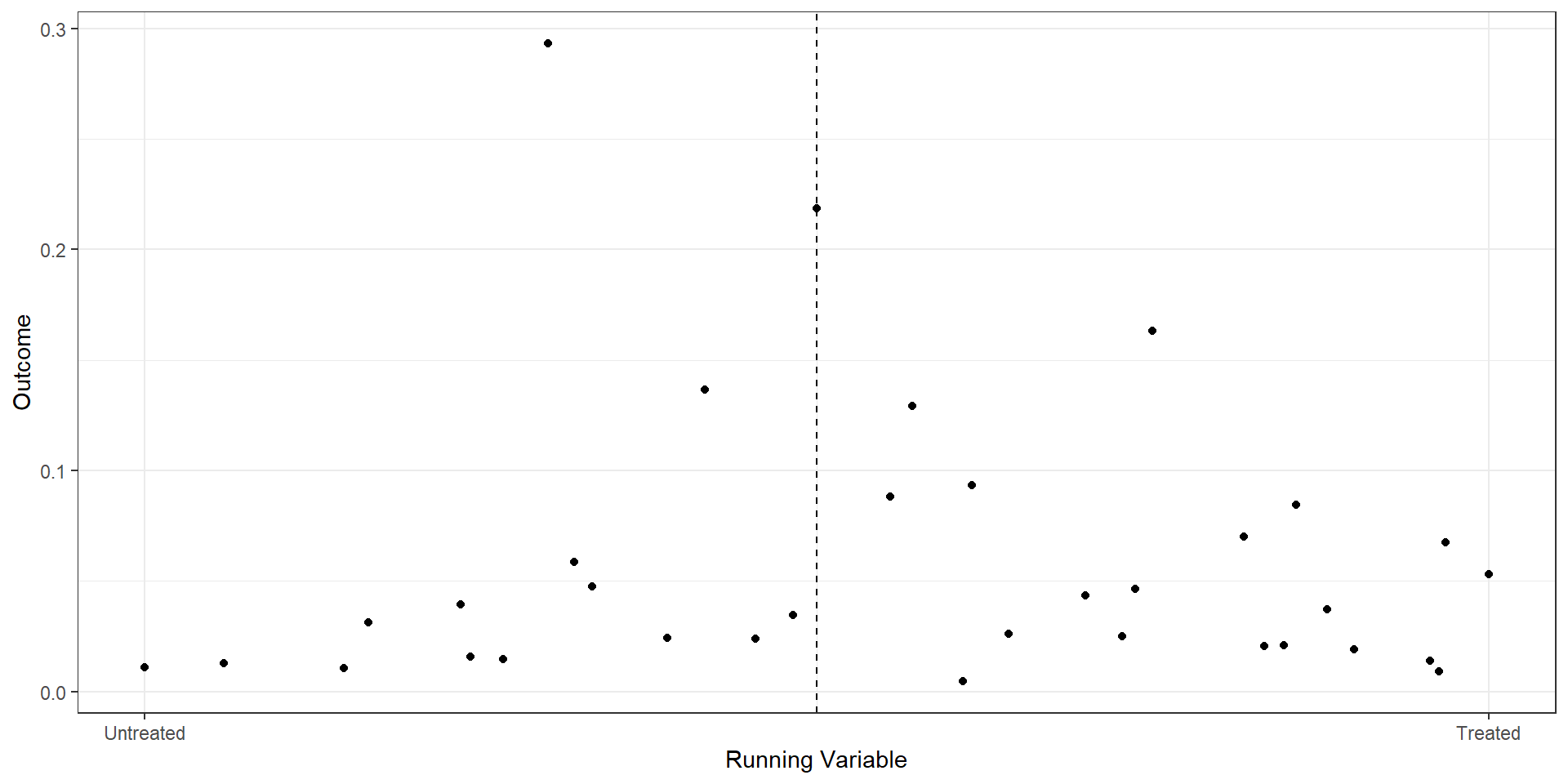
Binned Scatterplot

rd.result <- rdplot(ma_25star$mkt_share, ma_25star$raw_rating, 
                    c=2.25, p=2,
                    title="RD Plot with Binned Average", 
                    x.label="Running Variable", 
                    y.label="Outcome",
                    hide = TRUE)
bin.avg <- as_tibble(rd.result$vars_bins)
plot.bin <- bin.avg %>% ggplot(aes(x=rdplot_mean_x,y=rdplot_mean_y)) + 
  geom_point() + theme_bw() +
  geom_vline(aes(xintercept=2.25),linetype='dashed') +
  scale_x_continuous(
    breaks = c(2, 2.5),
    label = c("Untreated", "Treated")
  ) +
  xlab("Running Variable") + ylab("Outcome")
#| eval: false

import pandas as pd
import matplotlib.pyplot as plt
from rdrobust import rdplot

# RD plot using mkt_share as outcome and raw_rating as running variable
rd_result = rdplot(
    y=ma_25star["mkt_share"].values,
    x=ma_25star["raw_rating"].values,
    c=2.25,
    title="RD Plot with Binned Average",
    x_label="Running Variable",
    y_label="Outcome",
    hide=True  # don't show the built-in plot
)

# vars_bins is already a pandas DataFrame in the Python implementation
bin_avg = rd_result.vars_bins

# Recreate the custom plot
fig, ax = plt.subplots()

ax.scatter(
    bin_avg["rdplot_mean_x"],
    bin_avg["rdplot_mean_y"]
)

ax.axvline(x=2.25, linestyle="--")

ax.set_xticks([2.0, 2.5])
ax.set_xticklabels(["Untreated", "Treated"])

ax.set_xlabel("Running Variable")
ax.set_ylabel("Outcome")
ax.set_title("RD Plot with Binned Average")

plt.tight_layout()
plt.show()

RD from OLS

ma.rd1 <- ma_25star %>%
  mutate(score = raw_rating - 2.25,
         treat = (score>=0),
         window1 = (score>=-.175 & score<=.175),
         window2 = (score>=-.125 & score<=.125),
         score_treat=score*treat)
star25.1 <- lm(mkt_share ~ score + treat, data=ma.rd1)
star25.2 <- lm(mkt_share ~ score + treat, data= (ma.rd1 %>% filter(window1==TRUE)))
star25.3 <- lm(mkt_share ~ score + treat + score_treat, data= (ma.rd1 %>% filter(window1==TRUE)))
star25.4 <- lm(mkt_share ~ score + treat + score_treat, data= (ma.rd1 %>% filter(window2==TRUE)))
est1 <- as.numeric(star25.1$coef[3])
est2 <- as.numeric(star25.2$coef[3])
est3 <- as.numeric(star25.3$coef[3])
est4 <- as.numeric(star25.4$coef[3])

rows <- tribble(~term, ~ m1, ~ m2, ~ m3 , ~ m4,
                'Bandwidth', "0.25", "0.175", "0.175", "0.125")
attr(rows, 'position')  <- 7
import pandas as pd
import statsmodels.formula.api as smf

# Start from ga_ma_4star DataFrame
ma_rd1 = ma_25star.copy()

ma_rd1["score"] = ma_rd1["raw_rating"] - 2.25
ma_rd1["treat"] = (ma_rd1["score"] >= 0).astype(int)
ma_rd1["window1"] = (ma_rd1["score"].between(-0.175, 0.175))
ma_rd1["window2"] = (ma_rd1["score"].between(-0.125, 0.125))
ma_rd1["score_treat"] = ma_rd1["score"] * ma_rd1["treat"]

# Regressions
star25_1 = smf.ols("mkt_share ~ score + treat", data=ma_rd1).fit()
star25_2 = smf.ols("mkt_share ~ score + treat",
                  data=ma_rd1[ma_rd1["window1"]]).fit()
star25_3 = smf.ols("mkt_share ~ score + treat + score_treat",
                  data=ma_rd1[ma_rd1["window1"]]).fit()
star25_4 = smf.ols("mkt_share ~ score + treat + score_treat",
                  data=ma_rd1[ma_rd1["window2"]]).fit()

# Extract treatment effect (coefficient on treat)
est1 = float(star25_1.params["treat"])
est2 = float(star25_2.params["treat"])
est3 = float(star25_3.params["treat"])
est4 = float(star25_4.params["treat"])

# Bandwidth row (analogous to tribble + attribute)
rows = pd.DataFrame(
    {
        "term": ["Bandwidth"],
        "m1": ["0.25"],
        "m2": ["0.175"],
        "m3": ["0.175"],
        "m4": ["0.125"],
    }
)
rows.attrs["position"] = 7
modelsummary(list(star25.1, star25.2, star25.3, star25.4),
          keep=c("score", "treatTRUE", "score_treat"),
          coef_map=c("score"="Raw Score", 
                    "treatTRUE"="Treatment",
                    "score_treat"="Score x Treat"),
          gof_map=c("nobs", "r.squared"),
          add_rows=rows)
(1) (2) (3) (4)
Raw Score 0.010 -0.277 -0.141 -0.204
(0.021) (0.038) (0.050) (0.054)
Treatment 0.012 0.058 0.066 0.070
(0.006) (0.008) (0.008) (0.010)
Score x Treat -0.328 -0.255
(0.078) (0.117)
Bandwidth 0.25 0.175 0.175 0.125
Num.Obs. 6935 4605 4605 4422
R2 0.009 0.012 0.016 0.013

Interpretation

  • OLS on full sample: 1.2% increase in market shares among 4-star plans versus 3.5-star plan
  • RD on 0.175 bandwidth: 5.8% increase when imposing constant slopes, 6.6% increase when allowing for differential slopes
  • RD on 0.125 bandwidth: 7% increase (again allowing for differential slopes)

Built-in RD packages

## fixed bandwidth
est1 <- rdrobust(y=ma.rd1$mkt_share, x=ma.rd1$score, c=0,
                 h=0.125, p=1, kernel="uniform", vce="hc0")

## optimal bandwidth
estopt <- rdrobust(y=ma.rd1$mkt_share, x=ma.rd1$score, c=0,
                 p=1, kernel="uniform", vce="hc0")
from rdrobust import rdrobust

# Fixed bandwidth
est1 = rdrobust(
    y=ma_rd1["mkt_share"].values,
    x=ma_rd1["score"].values,
    c=0,
    h=0.125,
    p=1,
    kernel="uniform",
    vce="hc0",
    masspoints="off",
)

# Optimal bandwidth (letting rdrobust choose h)
estopt = rdrobust(
    y=ma_rd1["mkt_share"].values,
    x=ma_rd1["score"].values,
    c=0,
    p=1,
    kernel="uniform",
    vce="hc0",
    masspoints="off",
)
Sharp RD estimates using local polynomial regression.

Number of Obs.                 6935
BW type                      Manual
Kernel                      Uniform
VCE method                      HC0

Number of Obs.                 4303         2632
Eff. Number of Obs.            4129          293
Order est. (p)                    1            1
Order bias  (q)                   2            2
BW est. (h)                   0.125        0.125
BW bias (b)                   0.125        0.125
rho (h/b)                     1.000        1.000
Unique Obs.                    4303         2632

=============================================================================
        Method     Coef. Std. Err.         z     P>|z|      [ 95% C.I. ]       
=============================================================================
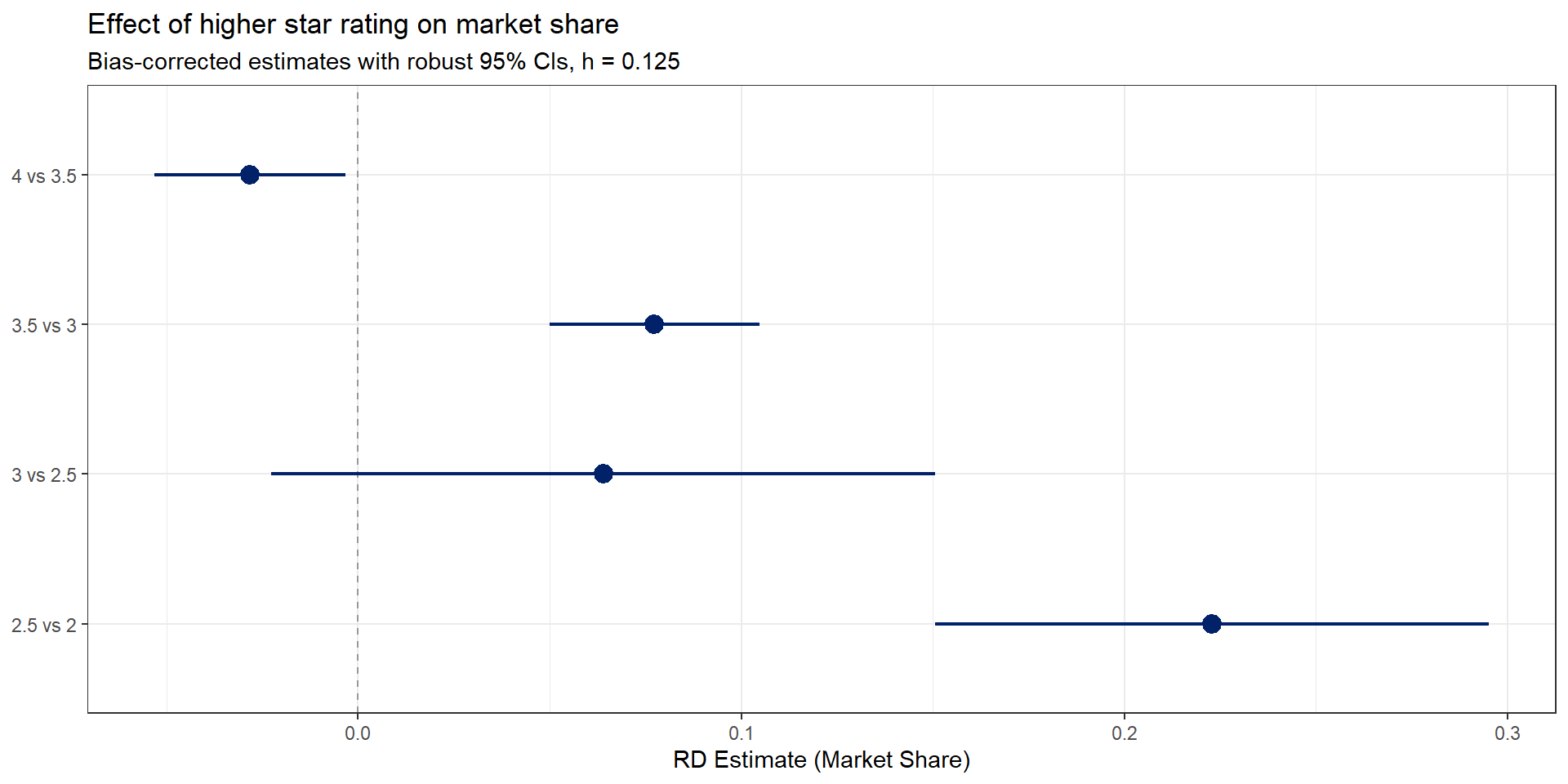
  Conventional     0.070     0.016     4.253     0.000     [0.038 , 0.102]     
        Robust         -         -     6.045     0.000     [0.151 , 0.295]     
=============================================================================
Sharp RD estimates using local polynomial regression.

Number of Obs.                 6935
BW type                       mserd
Kernel                      Uniform
VCE method                      HC0

Number of Obs.                 4303         2632
Eff. Number of Obs.             274           41
Order est. (p)                    1            1
Order bias  (q)                   2            2
BW est. (h)                   0.033        0.033
BW bias (b)                   0.068        0.068
rho (h/b)                     0.478        0.478
Unique Obs.                      14           22

=============================================================================
        Method     Coef. Std. Err.         z     P>|z|      [ 95% C.I. ]       
=============================================================================
  Conventional     0.181     0.053     3.438     0.001     [0.078 , 0.284]     
        Robust         -         -     3.741     0.000     [0.096 , 0.306]     
=============================================================================

Manipulation and Balance Checks

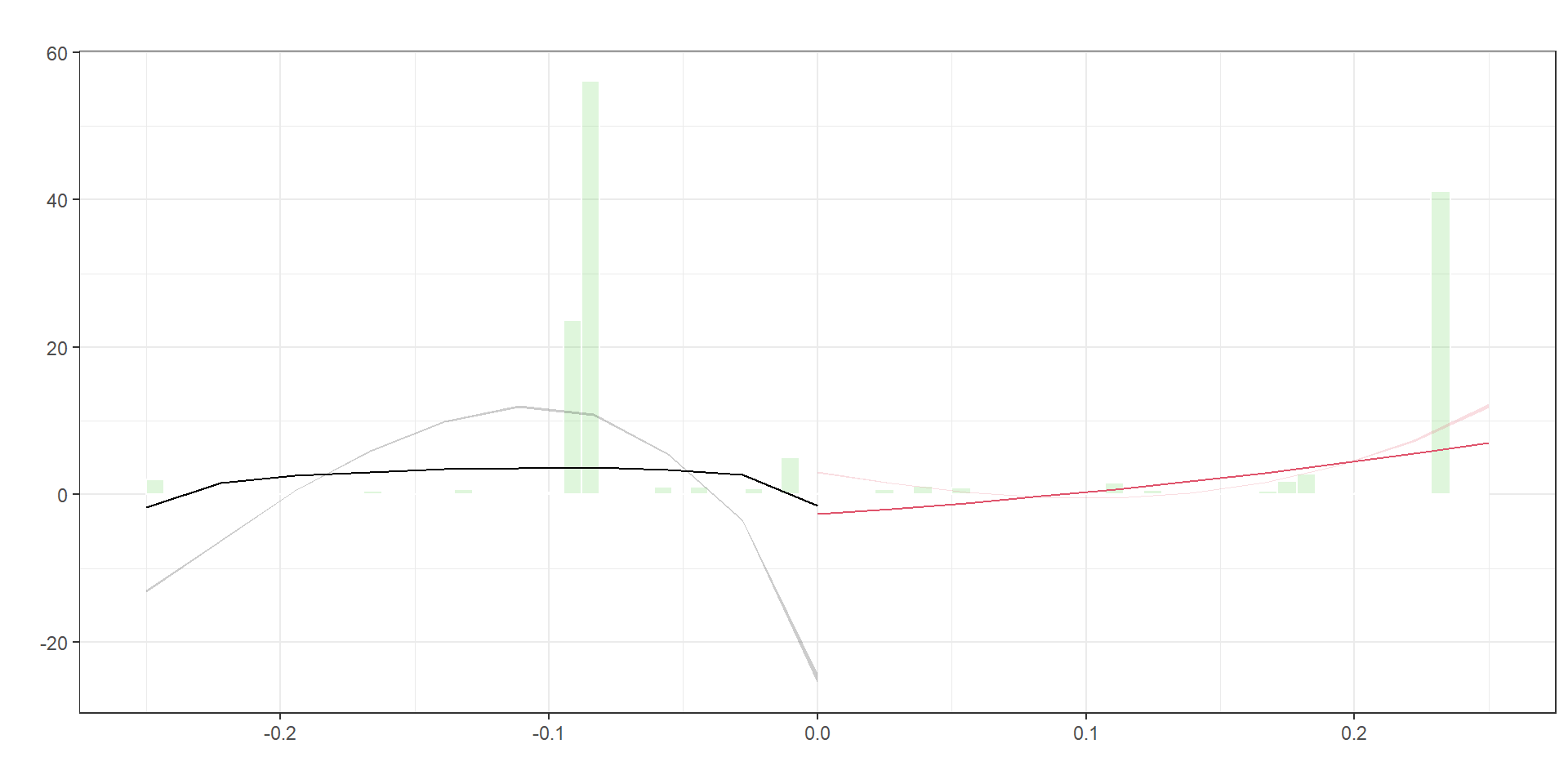
Manipulation of the running variable

dens1 <- rddensity(ma.rd1$score, c=0)
densplot <- rdplotdensity(dens1, ma.rd1$score)

from rdrobust import rddensity, rdplotdensity
import matplotlib.pyplot as plt

# Run McCrary-style density test at cutoff 0
dens1 = rddensity(x=ma_rd1["score"].values, c=0)

# Create the density plot object (rdplotdensity returns a matplotlib figure/axes)
densplot = rdplotdensity(dens1, x=ma_rd1["score"].values)

# If you want to explicitly show or tweak:
fig = densplot["fig"]
ax = densplot["ax"]

ax.set_title("Density test around cutoff")
ax.set_xlabel("Score")
ax.set_ylabel("Estimated density")

plt.show()

Manipulation testing using local polynomial density estimation.

Number of obs =       6935
Model =               unrestricted
Kernel =              triangular
BW method =           estimated
VCE method =          jackknife

c = 0                 Left of c           Right of c          
Number of obs         4303                2632                
Eff. Number of obs    4303                2632                
Order est. (p)        2                   2                   
Order bias (q)        3                   3                   
BW est. (h)           0.25                0.25                

Method                T                   P > |T|             
Robust                55.9095             0                   


P-values of binomial tests (H0: p=0.5).

Window Length / 2          <c     >=c    P>|T|
0.028                     274      41    0.0000
0.052                     322      97    0.0000
0.077                     368     168    0.0000
0.102                    4123     182    0.0000
0.127                    4129     293    0.0000
0.151                    4164     293    0.0000
0.176                    4184     421    0.0000
0.201                    4195     573    0.0000
0.225                    4207     573    0.0000
0.250                    4303    2632    0.0000

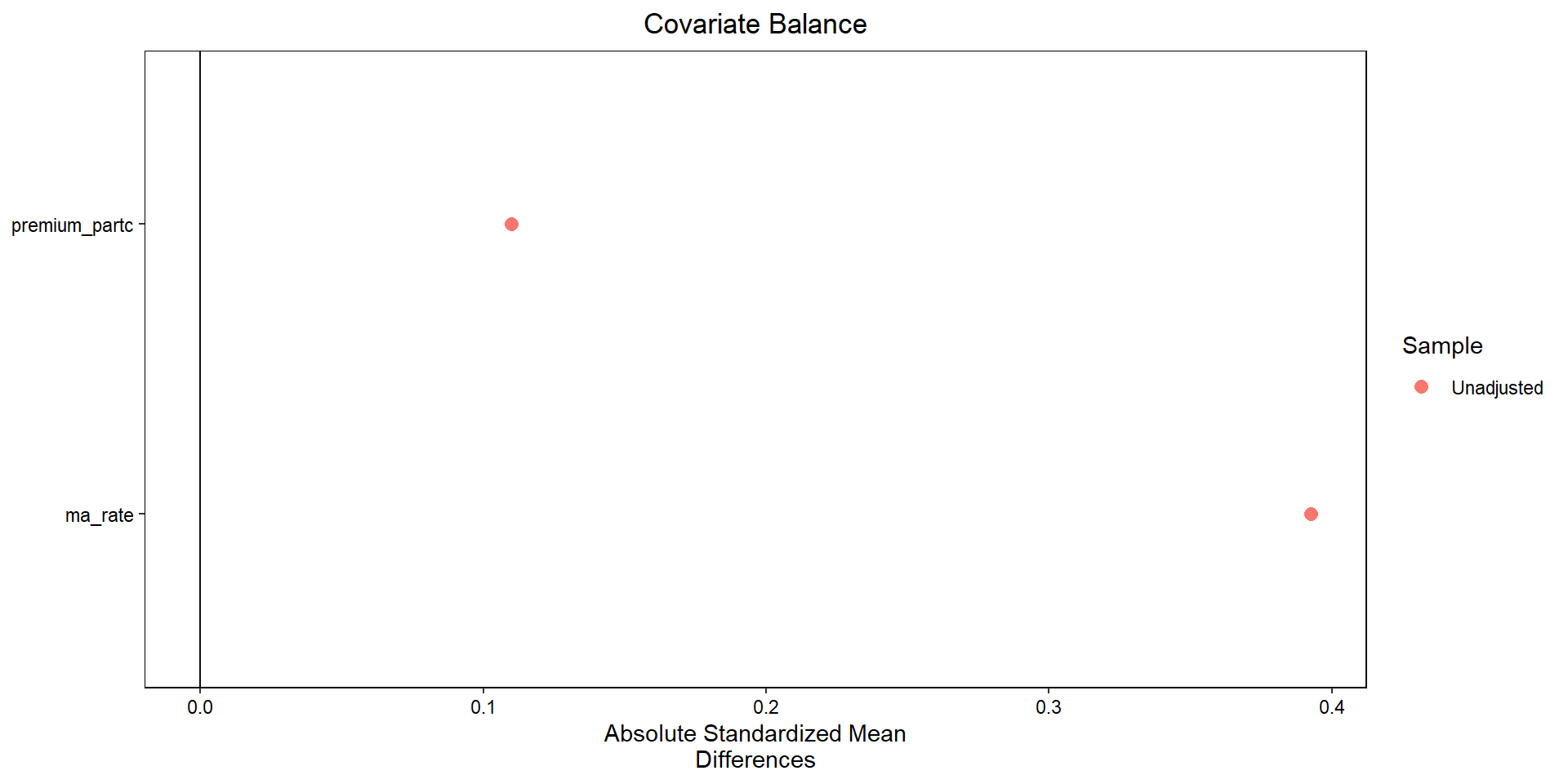
Covariate balance

match.dat <- matchit(treat~premium_partc + ma_rate, 
                     data=ma.rd1 %>% 
                       filter(window2==TRUE, 
                              !is.na(treat), 
                              !is.na(premium_partc), 
                              !is.na(ma_rate)),
                     method=NULL, distance="mahalanobis")
import numpy as np
import pandas as pd
from sklearn.neighbors import NearestNeighbors
import matplotlib.pyplot as plt

# 1. Subset data as in your R code
sub = (
    ma_rd1
    .loc[
        (ma_rd1["window2"]) &
        ma_rd1["treat"].notna() &
        ma_rd1["premium_partc"].notna() &
        ma_rd1["ma_rate"].notna()
    ]
    .copy()
)

covariates = ["premium_partc", "ma_rate"]

X = sub[covariates].to_numpy()
t = sub["treat"].astype(int).to_numpy()

# 2. Mahalanobis nearest-neighbor matching (1:1)
#    Estimate covariance matrix of covariates and its inverse
V = np.cov(X, rowvar=False)
V_inv = np.linalg.inv(V)

# Fit NN on controls only
nn = NearestNeighbors(
    n_neighbors=1,
    metric="mahalanobis",
    metric_params={"V": V}
)
nn.fit(X[t == 0])

# For each treated unit, find nearest control
dist, idx = nn.kneighbors(X[t == 1])
control_matches = sub.loc[t == 0].iloc[idx[:, 0]].copy()
treated_matched = sub.loc[t == 1].copy()

# Build matched sample
matched = pd.concat(
    [
        treated_matched.reset_index(drop=True),
        control_matches.reset_index(drop=True)
    ],
    axis=0
).reset_index(drop=True)
matched["treat"] = np.r_[np.ones(len(treated_matched)), np.zeros(len(control_matches))]

# 3. Function for standardized mean differences (SMD)
def smd(df, var, treat_col="treat"):
    g1 = df[df[treat_col] == 1][var]
    g0 = df[df[treat_col] == 0][var]
    m1, m0 = g1.mean(), g0.mean()
    s = np.sqrt(0.5 * (g1.var(ddof=1) + g0.var(ddof=1)))
    return (m1 - m0) / s

# SMDs before and after matching
smd_before = [smd(sub, v) for v in covariates]
smd_after  = [smd(matched, v) for v in covariates]

# 4. “Love plot” (absolute SMDs)
fig, ax = plt.subplots()

y_pos = np.arange(len(covariates))

ax.scatter(np.abs(smd_before), y_pos, marker="o", label="Unmatched")
ax.scatter(np.abs(smd_after),  y_pos, marker="s", label="Matched")

ax.set_yticks(y_pos)
ax.set_yticklabels(covariates)
ax.set_xlabel("Absolute standardized mean difference")
ax.axvline(0.1, linestyle="--")  # common reference line
ax.legend()
ax.invert_yaxis()  # to mimic cobalt’s ordering
plt.tight_layout()
plt.show()
Effects across Rating Thresholds

Effects for 2.5 versus 2.0 Stars

ma.rd225 <- ma_2009 %>%
  filter(Star_Rating==2 | Star_Rating==2.5) %>%
  mutate(score = raw_rating - 2.25,
         treat = (score>=0),
         window1 = (score>=-.175 & score<=.175),
         window2 = (score>=-.125 & score<=.125),
         score_treat=score*treat)

est225 <- rdrobust(y=ma.rd225$mkt_share, x=ma.rd225$score, c=0,
                 h=0.125, p=1, kernel="uniform", vce="hc0",
                 masspoints="off")
import pandas as pd
from py_rdpackages import rdrobust   # wrapper around rdrobust in R

# starting from ma_2009 as a pandas DataFrame
ma_rd225 = (
    ma_2009
    .loc[ma_2009["Star_Rating"].isin([2, 2.5])]
    .assign(
        score=lambda d: d["raw_rating"] - 2.25,
        treat=lambda d: (d["score"] >= 0).astype(int),
        window1=lambda d: d["score"].between(-0.175, 0.175),
        window2=lambda d: d["score"].between(-0.125, 0.125),
        score_treat=lambda d: d["score"] * d["treat"],
    )
)

est225 = rdrobust(
    y=ma_rd225["mkt_share"].to_numpy(),
    x=ma_rd225["score"].to_numpy(),
    c=0,
    h=0.125,
    p=1,
    kernel="uniform",   # if this errors, try kernel="uni"
    vce="hc0",
    masspoints="off"
)
Sharp RD estimates using local polynomial regression.

Number of Obs.                12127
BW type                      Manual
Kernel                      Uniform
VCE method                      HC0

Number of Obs.                 4545         7582
Eff. Number of Obs.            4129          293
Order est. (p)                    1            1
Order bias  (q)                   2            2
BW est. (h)                   0.125        0.125
BW bias (b)                   0.125        0.125
rho (h/b)                     1.000        1.000

=============================================================================
        Method     Coef. Std. Err.         z     P>|z|      [ 95% C.I. ]       
=============================================================================
  Conventional     0.070     0.016     4.253     0.000     [0.038 , 0.102]     
        Robust         -         -     6.045     0.000     [0.151 , 0.295]     
=============================================================================

Effects for 3.0 versus 2.5 Stars

ma.rd275 <- ma_2009 %>%
  filter(Star_Rating==2.5 | Star_Rating==3) %>%
  mutate(score = raw_rating - 2.75,
         treat = (score>=0),
         window1 = (score>=-.175 & score<=.175),
         window2 = (score>=-.125 & score<=.125),
         score_treat=score*treat)

est275 <- rdrobust(y=ma.rd275$mkt_share, x=ma.rd275$score, c=0,
                 h=0.125, p=1, kernel="uniform", vce="hc0",
                 masspoints="off")
# assuming ma_2009 is a pandas DataFrame and rdrobust is already imported

ma_rd275 = (
    ma_2009
    .loc[ma_2009["Star_Rating"].isin([2.5, 3])]
    .assign(
        score=lambda d: d["raw_rating"] - 2.75,
        treat=lambda d: (d["score"] >= 0).astype(int),
        window1=lambda d: d["score"].between(-0.175, 0.175),
        window2=lambda d: d["score"].between(-0.125, 0.125),
        score_treat=lambda d: d["score"] * d["treat"],
    )
)

est275 = rdrobust(
    y=ma_rd275["mkt_share"].to_numpy(),
    x=ma_rd275["score"].to_numpy(),
    c=0,
    h=0.125,
    p=1,
    kernel="uniform",   # or "uni" if required by your wrapper
    vce="hc0",
    masspoints="off"
)
Sharp RD estimates using local polynomial regression.

Number of Obs.                11735
BW type                      Manual
Kernel                      Uniform
VCE method                      HC0

Number of Obs.                 7582         4153
Eff. Number of Obs.             313         1869
Order est. (p)                    1            1
Order bias  (q)                   2            2
BW est. (h)                   0.125        0.125
BW bias (b)                   0.125        0.125
rho (h/b)                     1.000        1.000

=============================================================================
        Method     Coef. Std. Err.         z     P>|z|      [ 95% C.I. ]       
=============================================================================
  Conventional     0.082     0.015     5.507     0.000     [0.053 , 0.111]     
        Robust         -         -     1.448     0.148    [-0.023 , 0.151]     
=============================================================================

Effects for 3.5 versus 3.0 Stars

ma.rd325 <- ma_2009 %>%
  filter(Star_Rating==3 | Star_Rating==3.5) %>%
  mutate(score = raw_rating - 3.25,
         treat = (score>=0),
         window1 = (score>=-.175 & score<=.175),
         window2 = (score>=-.125 & score<=.125),
         score_treat=score*treat)

est325 <- rdrobust(y=ma.rd325$mkt_share, x=ma.rd325$score, c=0,
                 h=0.125, p=1, kernel="uniform", vce="hc0",
                 masspoints="off")
# assuming ma_2009 is a pandas DataFrame and rdrobust is already imported

ma_rd325 = (
    ma_2009
    .loc[ma_2009["Star_Rating"].isin([3, 3.5])]
    .assign(
        score=lambda d: d["raw_rating"] - 3.25,
        treat=lambda d: (d["score"] >= 0).astype(int),
        window1=lambda d: d["score"].between(-0.175, 0.175),
        window2=lambda d: d["score"].between(-0.125, 0.125),
        score_treat=lambda d: d["score"] * d["treat"],
    )
)

est325 = rdrobust(
    y=ma_rd325["mkt_share"].to_numpy(),
    x=ma_rd325["score"].to_numpy(),
    c=0,
    h=0.125,
    p=1,
    kernel="uniform",   # or "uni" depending on the Python wrapper
    vce="hc0",
    masspoints="off"
)
Sharp RD estimates using local polynomial regression.

Number of Obs.                 6704
BW type                      Manual
Kernel                      Uniform
VCE method                      HC0

Number of Obs.                 4635         2069
Eff. Number of Obs.            1020          784
Order est. (p)                    1            1
Order bias  (q)                   2            2
BW est. (h)                   0.125        0.125
BW bias (b)                   0.125        0.125
rho (h/b)                     1.000        1.000

=============================================================================
        Method     Coef. Std. Err.         z     P>|z|      [ 95% C.I. ]       
=============================================================================
  Conventional     0.007     0.009     0.744     0.457    [-0.011 , 0.025]     
        Robust         -         -     5.536     0.000     [0.050 , 0.105]     
=============================================================================

Effects for 4 versus 3.5 Stars

ma.rd375 <- ma_2009 %>%
  filter(Star_Rating==3.5 | Star_Rating==4) %>%
  mutate(score = raw_rating - 3.75,
         treat = (score>=0),
         window1 = (score>=-.175 & score<=.175),
         window2 = (score>=-.125 & score<=.125),
         score_treat=score*treat)

est375 <- rdrobust(y=ma.rd375$mkt_share, x=ma.rd375$score, c=0,
                 h=0.125, p=1, kernel="uniform", vce="hc0",
                 masspoints="off")
# assuming ma_2009 is a pandas DataFrame and rdrobust is already imported

ma_rd375 = (
    ma_2009
    .loc[ma_2009["Star_Rating"].isin([3.5, 4])]
    .assign(
        score=lambda d: d["raw_rating"] - 3.75,
        treat=lambda d: (d["score"] >= 0).astype(int),
        window1=lambda d: d["score"].between(-0.175, 0.175),
        window2=lambda d: d["score"].between(-0.125, 0.125),
        score_treat=lambda d: d["score"] * d["treat"],
    )
)

est375 = rdrobust(
    y=ma_rd375["mkt_share"].to_numpy(),
    x=ma_rd375["score"].to_numpy(),
    c=0,
    h=0.125,
    p=1,
    kernel="uniform",   # or "uni" if that's the accepted alias
    vce="hc0",
    masspoints="off"
)
Sharp RD estimates using local polynomial regression.

Number of Obs.                 4238
BW type                      Manual
Kernel                      Uniform
VCE method                      HC0

Number of Obs.                 3179         1059
Eff. Number of Obs.             755          737
Order est. (p)                    1            1
Order bias  (q)                   2            2
BW est. (h)                   0.125        0.125
BW bias (b)                   0.125        0.125
rho (h/b)                     1.000        1.000

=============================================================================
        Method     Coef. Std. Err.         z     P>|z|      [ 95% C.I. ]       
=============================================================================
  Conventional    -0.019     0.007    -2.663     0.008    [-0.033 , -0.005]    
        Robust         -         -    -2.217     0.027    [-0.053 , -0.003]    
=============================================================================

RD with discrete variables

  • Allow for fewer mass points
  • Assume random assignment between mass points
  • Inference using Fisher’s exact test